 GPSJump
How to Change Your iPhone GPS Location Without Jailbreak (2026)
The first time I needed to change my iPhone's GPS location, every guide I found told me to either jailbreak my phone or install some sketchy app that wanted my Apple ID password. Neither felt worth it for something that should be simple. So I kept digging — and it turns out there's a clean way that Apple itself makes possible.
Here's the honest, no-nonsense version.
Why the usual methods aren't great
- Jailbreaking voids your warranty, opens security holes, and breaks with every iOS update. Way too much for just moving a pin on a map.
- "Fake GPS" apps from the store are usually limited, ask for too many permissions, and some quietly sell your data.
There's a better option hiding in plain sight: Apple has an official developer feature called Simulate Location — the same tool app developers use to test their apps. It runs from your computer over a USB cable and changes nothing on your iPhone. That's exactly what GPSJump is built on.
The method (3 steps, about two minutes)
- Install and connect. Download GPSJump on your Windows PC and plug in your iPhone with a USB cable. The installer sets up Apple's device driver for you.
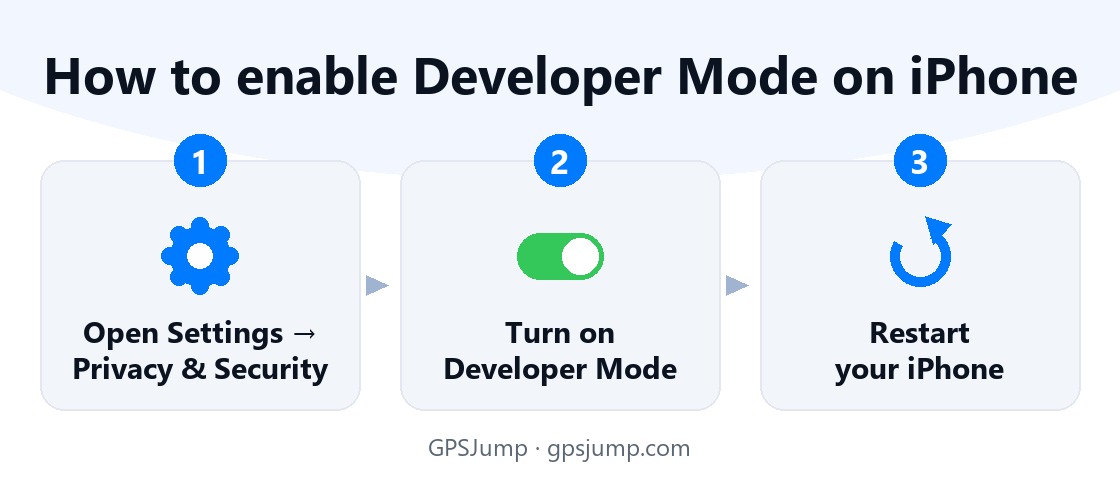
- Enable Developer Mode once. On the iPhone: Settings → Privacy & Security → Developer Mode → turn it on and restart. GPSJump walks you through it, and you only do it once.
- Pick a spot. Open the map in the app, click anywhere on Earth, and hit "Move here." Done — your iPhone's location is now there, and it shows up in Maps and every other location-based app.
Is it safe?
Yes, and this is the part that sold me: the location is only simulated while the app is running. Close it, and your phone snaps back to its real GPS automatically. Everything happens locally between your computer and your phone over the cable — no external server ever sees your location, and nothing gets installed on the iPhone.
Why people change their location
- Location-based games like Pokémon GO — reach faraway spots from home.
- Privacy — don't hand your real location to every app.
- App testing — developers checking how an app behaves in another country.
- Geo-restricted content or apps that expect you to be in a certain area.
Bottom line
Changing your iPhone's GPS location doesn't require a jailbreak or any risk. There's a clean, official way that works in one click — and you can try it free. Grab GPSJump and test it yourself; you get two free location changes with no subscription.
Use location changing responsibly and in line with the terms of the apps you use.
Try GPSJump free
Change your iPhone's GPS location in one click — no jailbreak. Get 2 free location changes.
Download for Windows